

Access
Roles per person: who uses, who approves and who administers. Each agent gets only the tools for its area.
AI agents your company controls, connected to  Bling,
 HubSpot,
 Sheets and
 WhatsApp, on your company's server, with approval before every action.
On Mac and Windows, or on your company's Linux server. Download the beta
The agent splits the request across the team, shows every step and delivers the result in the chat. Anything leaving the company waits for your OK, in the same place.
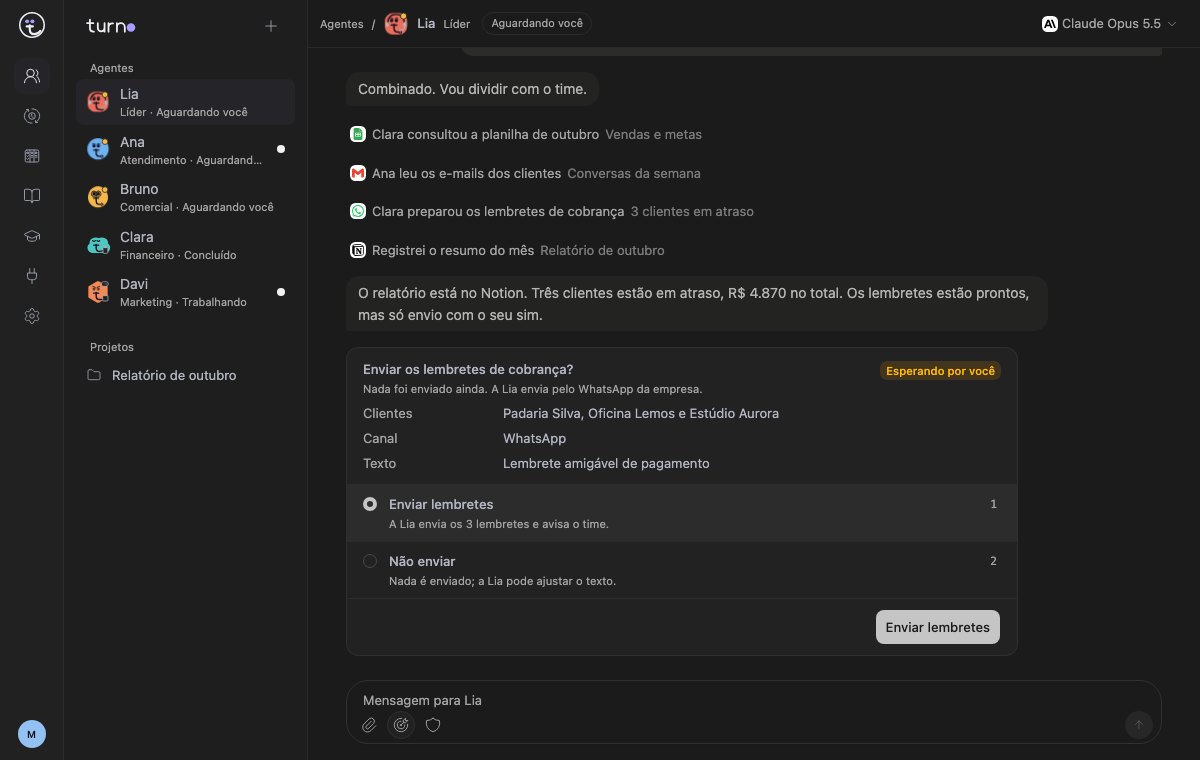
Lia leads the sample team. She handed parts of the request to Clara (finance) and Ana (support), and stopped before sending any message.
The people who decide, use, run the infrastructure and build all work around the same agents. Everyone sees what they need.
Server, AI models, installation, integrations and support in a single contract. Your company doesn't open provider accounts, manage API keys or maintain servers.
Book a callTurno is the layer that brings people, agents, models and tools together. Swap an agent's model or add a tool without rebuilding the rest.


Chats, workflows and vendor agents all put AI to work. In Turno, the agents, the data and the rules belong to your company.
| Criterion | Turnofor business | AI chatlike ChatGPT and Claude | Workflow automationlike Zapier and n8n | Vendor agentsin the vendor's cloud |
|---|---|---|---|---|
| Who controls the agent | YouRole, instructions, memory and limits set by your company | No oneThere's no agent, just a chat window | Whoever built the workflowWhen the process changes, someone redraws it | The vendorYou use the agent as it comes |
| AI model | AnySwitch providers whenever you want, or use local models | Locked to oneOnly the chat vendor's models | Per stepOne model configured at each step | Their choiceYou can't switch or compare |
| Where the data lives | At your companyOn your own computer or server | In their cloudChats and files stay there | DependsSome have a self-hosted version | In their cloudNo self-hosted option |
| Before acting | Waits for your OKMessages, reminders, payments or file deletion, by role | Doesn't actYou copy and paste the result | Manual stepHas to be drawn into the workflow | Their rulesYou accept what the vendor offers |
| Teamwork | Agents split the workA lead hands parts to specialists and pulls the result together | One isolated chatEveryone in their own chat | Fixed stepsThe order is whatever was drawn | Inside the productOnly among their own agents |
| Audit log | Every actionTime, tool, who asked and who approved, on your server | Chat historyDoesn't log actions outside the chat | RunsPer workflow step | In their dashboardStays with the vendor |
| How you ask | In plain wordsIn the chat, on your phone or on WhatsApp | In plain wordsOne chat at a time | By drawingSomeone builds and maintains the workflow | In plain wordsInside their product |
| On schedule | RoutinesOn the set day and time, even in the middle of the night | Only when you open itSomeone has to ask | TriggersBy time or event | ScheduledWithin the product's rules |
| AI cost | The account you already pay forNo markup on usage, or everything included in the full package | Per-seat subscriptionOne plan per user | Per runUsually billed per task run | Built into their priceUsage is bundled in, out of sight |
| If you leave | Take everythingAgents, memory and history live on your server | Left behindChats live in the vendor's account | Export the workflowsAnd rebuild the connections elsewhere | Start from scratchThe agents can't leave the product |
Each agent only sees the tools it was given. Sensitive actions wait for whoever holds the approver role, and the company can block outright what must never happen.
BlingNo accessReadRead and writeSheetsNo accessReadRead and writeWhatsAppNo accessReadRead and writeHubSpotNo accessReadRead and writeWhat Finance can do right now
Approval is tied to that request, with those amounts. If anything changes, the agent asks again.
Without the approver role you can't approve: the request goes to someone who has it.
Any command that deletes files always asks for approval, and what's removed can be restored.
Requests reach you in the app and on WhatsApp, with buttons. Decide from wherever you are.
When an agent repeats a task or gets corrected, it proposes a new skill. The skill only takes effect after someone on the team approves it.
Reply when a customer asks for a copy of an invoice.
I learned this from the 6 times Marina corrected my reply this week.
Start by requiring approval for everything and gradually allow what has proven it works.
What the agent learns lives on your company's server and can be forgotten whenever you want.
A proposed skill can be edited before it takes effect, or rejected in one click.
Who gets in, what each agent can do and a log of everything it touches. Enforced on the server, not just in the agent's instructions.
Roles per person: who uses, who approves and who administers. Each agent gets only the tools for its area.
Each action is allowed, requires approval or is blocked. Delete commands always ask, and go to the Trash.
With time, tool, who asked and who approved. Denials and blocks go in the same log, with the reason.
On the computer, on the phone and in the chats your team already uses. The same person, the same history and the same approvals everywhere.
 Android
Chats, results and approvals on your phone, over the company network.
iPhoneFollow and approve your team's work from your iPhone.
WhatsAppChat and approve through the company number, with no messages to people who didn't ask.
 Slack
 Teams
Call the agents in your team's channel and approve right there.
Agents, tools and chats on your computer. Beta, ready to download now.
 Telegram can chat and approve too.
From one person's computer to the company's server, on 24/7. The AI account stays with your company.
Download the beta, connect your AI account and set up your first agent in an afternoon.
In the trial afternoon, we run a real company routine and hand you the log of what ran and what it cost.
We install it on your company's server, with integrations, approval rules and support.
Small teams with no integrations: the Team plan is $40 a month for 3 people, plus $10 per extra person. See pricing
This is how Turno is built. One person sets the direction, a CTO who is an agent splits the work among specialists, and nothing that changes the product ships without her OK.
You pick a real company routine. We set up the agent, run it on your cases and hand you the log of what ran, what got stuck and what it cost.
The first afternoon is free and ends with your decision: go ahead, adjust or stop.
No LGPD (Brazilian data protection) certification and no SLA at this stage. Support replies during business hours. Free for personal use under the AGPL license; business use requires a commercial license.